We launch on Product Hunt on Sat 31 Oct. Follow the launch →

Branded checkout for Shopify

From Shopify cart to paid order, through your own Whop.

Shoppers pay on your branded checkout through your Whop account. CheckoutSwitch creates the paid order in Shopify.

Start free setup
See a live checkout →Whop test mode, nothing is charged

See a live checkout →Whop test mode, nothing is charged

Watch the setup 6:21

CheckoutSwitch on Product Hunt

One sale at Juniper & Vale, a fictional storeIllustrative example

Shopify storefront

junipervale.example

Cart

Linen overshirt

Sand / M · Qty 1

USD 64.00

SubtotalUSD 64.00

Shipping is added at checkout.

Your products, prices and orders stay in Shopify.

Your branded checkout

junipervale.checkoutswitch.com

Juniper & Vale

Linen overshirt64.00
Shipping6.90
TotalUSD 70.90
Whop payment frameCard · Apple Pay · Google Pay

Paid in your Whop

USD 70.90

Paid

Whop takes the payment into your own Whop account.

Paid Shopify order

Order #1042

Total

USD 70.90

1 item · Standard shipping

Linen overshirt × 164.00
Shipping6.90
Customer attachedPaid order

We create the paid order with the customer, items and shipping.

  1. Shopify storefront

    USD 64.00

    Linen overshirt · Sand / M

    junipervale.example

  2. Your branded checkout

    USD 70.90

    Paid in your Whop

    Paid

    junipervale.checkoutswitch.com

  3. Paid Shopify order

    USD 70.90

    Order #1042 · 1 item · customer attached

    Paid order
a month for your first store
$49
a month for each additional store
$29
CheckoutSwitch revenue share. Whop's fees are separate.
0%
free trial on your first store
7 days

Checkout and payment

Your checkout. Whop handles payment.

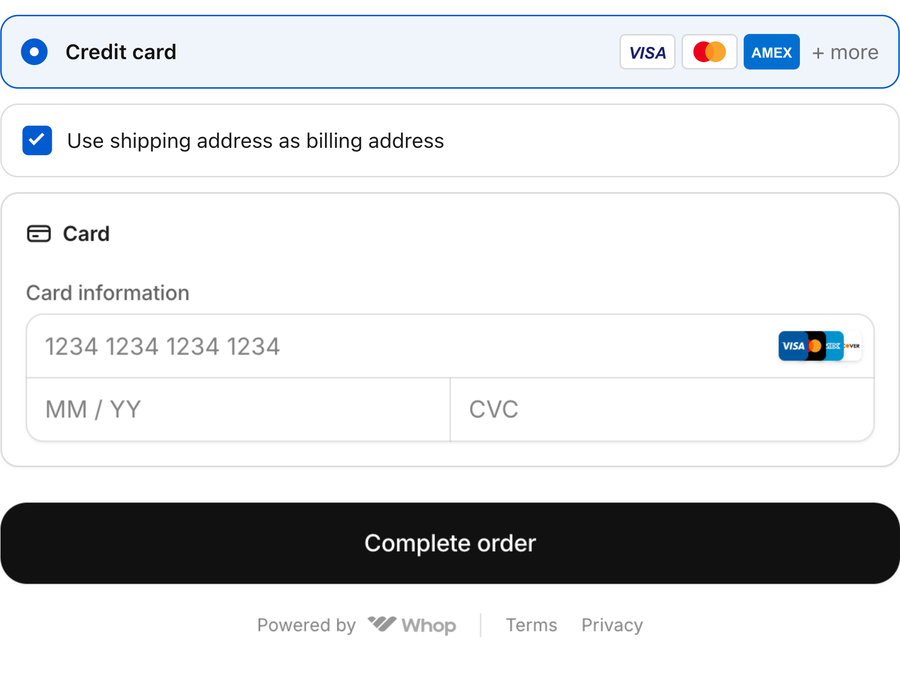
Shoppers pay through Whop's existing card fields. CheckoutSwitch creates the paid order in Shopify.

  1. Shoppers pay in Whop

    Card details stay inside Whop's existing payment frame.

  2. Payment goes to your Whop

    CheckoutSwitch never receives or holds the sale.

  3. The paid order appears in Shopify

    Customer, items and shipping are attached to the order.

junipervale.checkoutswitch.com
Shopper view
Whop's existing card fields with card number, expiry and security-code inputs

Juniper & Vale

1 item

Linen overshirt

Sand / M

64.00

Subtotal
64.00
Shipping
6.90
TotalUSD70.90
Card details are entered in Whop's frame, not on CheckoutSwitch pages.
Paid to your WhopUSD 70.90
Shopify order #1042Paid, in your admin
Illustrative preview · Whop test mode

The problem

Shopify Payments is offered in 40 countries.

If your store is anywhere else, Shopify's own help page tells you to use a third-party payment provider.

These figures measure different things. Whop verifies each business before it pays out and payout options vary by country, so payout coverage doesn't mean every merchant or business is eligible.

From Shopify's and Whop's own pages, read 10 October 2026. Availability and fees change; check the source.

After the sale

See which payments have Shopify orders.

CheckoutSwitch checks Whop payments against Shopify orders every 15 minutes and flags payments that need attention.

Example scenario

Switch between a healthy check and a payment that needs attention.

Juniper & Vale · Overview

Illustrative example
Every payment has an orderChecked against Whop 4 minutes ago.

Paid in Whop today

23

Shopify orders made

23

Paid, no order yet

0

Latest payments

Latest payments, illustrative example
TimeAmountShopify orderState
14:02 UTCUSD 70.90#1042Paid order
13:47 UTCUSD 128.00#1041Paid order
13:21 UTCUSD 64.00#1040Paid order
12:58 UTCUSD 91.50#1039Paid order
  • USD 70.9014:02 UTC
    Order #1042Paid order
  • USD 128.0013:47 UTC
    Order #1041Paid order
  • USD 64.0013:21 UTC
    Order #1040Paid order
  • USD 91.5012:58 UTC
    Order #1039Paid order

Juniper & Vale · Overview

Illustrative example
1 payment has no Shopify order yetChecked against Whop 4 minutes ago. Our team has been alerted. Don't charge the customer again; write to us and we'll sort it out.

Paid in Whop today

23

Shopify orders made

22

Paid, no order yet

1

Needs attention

Latest payments

Latest payments, illustrative example
TimeAmountShopify orderState
14:02 UTCUSD 70.90No Shopify order yetPaid · no order yet
13:47 UTCUSD 128.00#1041Paid order
13:21 UTCUSD 64.00#1040Paid order
12:58 UTCUSD 91.50#1039Paid order
  • USD 70.9014:02 UTC
    Order No Shopify order yetPaid · no order yet
  • USD 128.0013:47 UTC
    Order #1041Paid order
  • USD 64.0013:21 UTC
    Order #1040Paid order
  • USD 91.5012:58 UTC
    Order #1039Paid order
  • If Whop reports a payment twice, you still get one order.
  • We don't email you about a missing order yet: it shows on your store page and our team is alerted.

Who it's for

Who CheckoutSwitch is for.

Any Shopify plan, no Plus needed.

  • Stores where Shopify Payments isn't offered

    Take payment through your own Whop account instead.

  • Stores paid through Whop, or that want to be

    Payments go into your own Whop account, not into ours.

  • Stores that want their own name on the checkout

    Your logo, colours and header, on your own address.

  • Owners of more than one Shopify store

    One login for all of them, each with its own address and colours.

Not for you if

  • You want a payment method inside Shopify's own checkout.
  • You want someone other than Whop to hold and pay out your money.

You'll need

A Shopify store on any plan, and a Whop account. New to Whop? Our guide shows how to open one.

Pricing

Simple pricing for every store.

One plan per store, no CheckoutSwitch revenue share, and no charge while you set up.

Whop's processing and payout fees are separate.

CheckoutSwitch plan

$49a month for your first store

Add another store for $29 a month. CheckoutSwitch takes 0% of your sales.

  • 7 days free on your first store
  • Setup is free
  • Cancel before the trial ends to avoid a charge
  • Whop's fees are separate

Billing comparison

Monthly or yearly
US dollars
StoreMonthlyYearly
First store$49$490
Each additional store$29$290
Yearly billing gives you two months free.First store: $490 a year. Each additional store: $290 a year.

First-store trial

Your first store is free for 7 days. Add a card on Whop's secure form when you switch on; extra stores have no trial.

Whop's fees

CheckoutSwitch takes 0% of your sales. Whop's card processing and payout fees are paid to Whop, not to us.

Included

Shipping and taxes from your Shopify settings, payment-to-order checks every 15 minutes, and email support.

If your plan ends

Your checkout pauses and shoppers go to Shopify's own checkout with the same cart; your settings are kept.

Questions

What people ask before they start.

Something else? Email hello@checkoutswitch.com.

Is this a Shopify payment method?

No. Shoppers leave Shopify's checkout for your checkout page, at yourstore.checkoutswitch.com or checkout.yourstore.com. Whop takes the payment there, into your own Whop account. We then create the paid order in Shopify, and every 15 minutes we check that none is missing.

Who is CheckoutSwitch for?

It's for stores where Shopify Payments isn't offered, stores already paid through Whop or that want to be, stores that want their own name on the checkout, and owners of more than one Shopify store.

Any Shopify plan, no Plus needed. You'll need a Whop account: Whop verifies your identity and business before it pays out, and payout options vary by country.

New to Whop? Our guide shows how to open one.

Does this get me around payment reviews or holds?

No. Every payment processor, Shopify Payments and Whop included, verifies accounts and can hold a reserve. With CheckoutSwitch your money goes into your own Whop account under Whop's terms; we never hold it, so none of that is in our hands.

How and when does Whop pay me?

Whop pays out to bank accounts, mobile wallets or crypto wallets; options vary by country. Standard Whop payouts take up to 5 business days. Next-day payouts to US banks cost $2.50, and instant payouts (where offered) cost 4% + $2.50.

Whop's card processing fees (from 2.7% + $0.30 for domestic cards) are paid to Whop, not to us.

From docs.whop.com, read 10 October 2026; fees change, check the source.

What if a payment has no order?

If a payment is still missing its order, it shows in red and our team is alerted. We don't email you about it yet. Don't charge the customer again; write to us and we'll sort it out. If Whop reports a payment twice, you still get one order.

What does it cost, and what if I change my mind?

Setup is free. When you switch on your first store you add a card on Whop's secure form; you aren't charged for 7 days and can cancel before then. Extra stores have no trial.

CheckoutSwitch takes 0% of your sales. Whop's card processing fees (from 2.7% + $0.30 for domestic cards; +1.5% for international cards; +1% if currency conversion applies) are paid to Whop, not to us. Payout fees depend on the method and country. A dispute costs $15; Whop's early dispute alerts are $29 per alert.

If your plan ends, your checkout pauses and shoppers go to Shopify's own checkout with the same cart; your settings are kept. If a card is declined, Whop tries again and your store keeps selling meanwhile.

Cancel any time; your plan runs to the end of the period you paid for and is not charged again. We'll email you at least 30 days before any price change.

Refunds follow our refund policy.

From docs.whop.com/fees, read 10 October 2026; fees change, check the source.

Which ad platforms can it send sales to?

Tracking setup sends checkout and purchase events to Google Ads, Meta, TikTok and Google Analytics 4, each with its own ID and each off until you add it. For Meta, TikTok and Google Analytics 4 you can also add a secret key, so each purchase is sent from our server too and still counted once.

Can I change my checkout address?

Manage your checkout address and custom domain from your integration's Domains & URL page. Each address must be available. Extra live integrations have no separate free trial.

Bring your checkout and Whop payments together.

Start free setup

Free to set up. Your first store has 7 days free.

Help & chat
CheckoutSwitch support

Quick answers. A real person when you need one.

Getting started

Create your account, add an integration, connect Shopify and Whop, choose your checkout address, then follow Install & verify before going live.

Shopify or Whop connection

Open your integration's Connections page. Check the store address, credentials and required permissions. One Shopify store can belong to one current integration; the same Whop business can serve multiple integrations. Never send API keys or passwords in chat.

Checkout address and domains

Open your integration's Domains & URL page to manage its checkout address or connect a custom domain. Each checkout address must be available. If an archived integration still blocks setup, contact support with the store address.

Billing, trials and coupons

Open Billing to see your current plan and available live capacity. Your first plan includes one live integration; additional simultaneous live integrations require additional capacity. Your own billing screen shows applicable trials, discounts and renewal details.

Checkout or payment problem

Tell us the integration name, what happened and when, and include a screenshot if possible. If a payment was deducted but no order appeared, contact us before trying another payment. Do not send card details, passwords or API secrets.

If we are away, leave your email and message. We will reply when available.

Chat is provided by tawk.to. Privacy policy · Email us